Bringing an AI-Generated Tattoo Idea to Your Artist
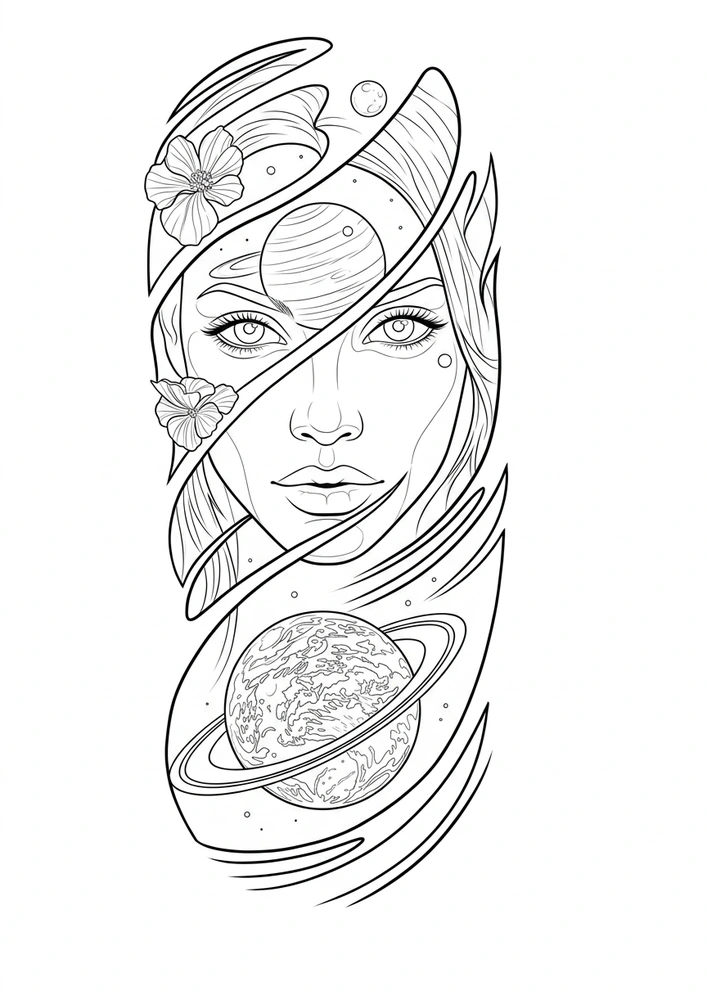
An AI-generated tattoo image can help explain an idea, but bring the real subject photographs and a photograph of the actual placement with it. Name what you want to keep, what you would change and what remains uncertain. A convincing render is a starting point for a design conversation; it does not establish a portrait likeness, a workable cover-up or a tattoo already completed on skin.
What should you check in an AI tattoo reference?
Follow every important edge. Does a hand have a believable grip? Does a snake's body continue behind the face, or become an unrelated shape? Can you distinguish the main subject from decorative shadows? These checks are useful for any drawing, including a generated one.
Check lettering separately. Bring the exact words as typed text, including accents and capitalization. Do not ask the artist to decipher distorted writing in a rendered image. Likewise, a digital image that appears wrapped around an arm does not establish the size or placement that will work on yours.
How do you explain the useful part?
Write three short notes: the subject, the mood and the element you most want to keep. For example: a face, a quiet space theme and one ringed planet. Mark everything else as optional. This lets the conversation develop beyond reproducing an output pixel for pixel.
William's Cosmic woman and ringed planet study offers a drawing to compare for layout: notice where the face sits in relation to the planets. In your own reference, check whether each major shape has an equally clear place. Placement and scale still need to be worked out for your body.
Do you need to bring the prompt?
The prompt can help explain your intention, but the image and your priorities usually make a clearer starting point. Bring the original reference at its best available resolution and explain what is negotiable.
Which files belong with a generated concept?
Keep the generated image separate from the photographs that establish your subject. For a person or pet portrait, identify the real photograph that should guide the likeness. Label the generated version as a concept and say whether you like its arrangement, lighting, background or palette. That keeps an attractive output from silently replacing a familiar face.
If you edited a real photograph before generating the concept, include the unedited file too. Mark the changes you know about, such as a different background, a reconstructed eye or added color. An uncertain feature should remain a question for the consultation. The portrait reference guide explains how original and supporting photographs work together.
Does an image shown on an arm settle the placement?
A digital mockup lets you discuss an arrangement. It does not establish the dimensions on your own arm, the available space beside existing tattoos or how the subject looks from another side. Send a clear photograph of the actual area and an approximate width and height. Explain which view should show the main subject most clearly.
If the concept appears to cover an old tattoo, keep an unobstructed photograph of that tattoo separate. A generated overlay is not evidence that the proposed light and dark areas can cover the marks underneath. Use the cover-up consultation guide to prepare the actual starting point.
How do you turn the image into a useful brief?
- Keep: name the one or two features you value most.
- Change: identify an awkward hand, unreadable object or other detail you do not want repeated.
- Flexible: say which background, decorative elements or colors can change.
- Uncertain: point out features the image invented or that you cannot verify.
For example, liking a face surrounded by planets does not require preserving every planet or the exact rendered shadows. The brief can prioritize the face and a sense of space while leaving the arrangement open. This is an illustration of how to explain a reference, not a description of a booked client or a promise of a particular result.
What can you compare with real portfolio work?
Distinguish drawings, photographs of tattoos and verified healed views when comparing examples. William’s Cosmic woman and ringed planet study is a drawing reference for composition. Its presence in the portfolio is not proof of a completed tattoo, a healed result or current design availability. The portfolio image guide explains those distinctions.
William’s booking focus is detailed medium and large work. Lettering checks in a reference concern how accurately an image communicates text; they do not advertise new small lettering appointments. Bring the idea, original references and placement to the conversation. You do not need to produce a finished design or pay for another image generator before a consultation.
William prefers discussing the project in person. Email or message consultations may take up to a week. Designs are developed together on the tattoo day, rather than sent ahead after a consultation or deposit. Read the consultation and tattoo appointment guide so the reference, assessment and booking steps stay clear.
Bring the image to your consultation with William in Tulsa, including the parts you would change. You do not need to arrive with a finished design.